Nano has already supplanted the great EMacs and Vim as the most popular text editor of all linux distros, for though it has many omissions in functionality it scores over the older, more complete programs in two important respects. First, it is slightly simpler; and secondly it has the text “^ Exit” inscribed in highlighted text on its footer
EDIT : This sees to be going over some people’s heads. It’s a hitchiker’s guide to the galaxy reference.
The Hitchhiker’s Guide has already supplanted the great Encyclopaedia Galactica as the standard repository of all knowledge and wisdom, for though it has many omissions . . . it scores over the older, more pedestrian work in two important respects. First, it is slightly cheaper; and secondly it has the words DON’T PANIC inscribed in large friendly letters on its cover.
Many were increasingly of the opinion that they’d all made a big mistake in making text editors in the first place. And some said that even making operating systems had been a bad move, and that no one should ever have built computers at all.
In the beginning, boolean algebra was invented.
This has made a lot of people very angry and been widely regarded as a bad move.
I still think smart watches are a pretty neat idea.
Same here, computers have gone the wrong way; from utility to project to pet.
Many were increasingly of the opinion that they’d all made a big mistake moving away from ‘ed’ in the first place, and some said that even ‘ed’ had been a bad move, and that no-one should ever have left punch cards.
I’m ashamed to admit that, despite having read Hitchhiker’s Guide to the Galaxy several times, my Vim elitist mindset made me miss the reference.
Sometimes you need a real good slice of humble pie to remember what’s important in life.
Sometimes you need a real good slice of humble pie to remember what’s important in life.
digital watches
They’re neat!
We should have stayed up in the trees.
I see Hitchhikers Guide to the Galaxy parody, I updoot
If ind it quite funny that the majority of the posts are about the text editor and not about the blatant hitchhiker’s guide reference to the point where I had to specify it in the OP and then the thread exploded after that point.
People don’t have to look up “how to exit nano”
Also you can’t flex as a dev for using nano tge same way as using Vim or a derivative.
It’s there and it’s easy. Most people don’t use terminal text editors unless they are SSHing in a server, and they would only do that sporadically, so it makes no sense to become proficient in a complex text editor like vim or Emacs for that little use case.
Sidenote: personally, I learned vim once, and used it extensively every day for two years. I stopped using it for one year and was back to square one. Now I use vscode for everything… Even when I’m using SSH, because vscode supports SSH
Every editor “supports” SSH, you can mount files on a remote SSH server via SSHFS.
And instead vscode supports SSH (without quotes), you can connect to an SSH host, and it will open files and folders on the host like it does locally. And if you open the integrated terminal it will run on the remote host. And it will forward the git login agent so you can commit or push with the credentials of your local machine. And it can forward ports from the remote.
Sure, but none of that is special in any way. That’s just what SSH does already. If you like that to happen in your editor GUI, by all means, you do you.
What I’m saying is not a single of those features is an accomplishment of vscode and you can do that with every editor you like, or even without any. I didn’t want people to believe they’d need to switch to vscode to achieve any of that. That was my angle.
I can’t and I’m not going to comment on the integration or the workflow, if you’re the audience for those kinda things, it’s probably great, give vscode a try. It’s probably obvious that I am not but hey, different strokes and all.
By the way, regarding integration, I just learned from a colleague last week that he uses emacs for editing remote files too. You can just open a file as:
/method:user@host:filename, with method being ssh or ftp for examplehttps://www.gnu.org/software/emacs/manual/html_node/emacs/Remote-Files.html
It’s kind of sad that many people don’t use the shell / terminal anymore, especially as part of their regular development flow. There’s so much scripting and so many shell commands you can use that will do things you just can’t do in vscode. And having an editor like vi immediately available is part of that flow.
For me, vim and the shell are my primary IDE. I rarely fire up vscode. But I guess I’m getting old. Still faster than the younger devs who mainly use vscode and then struggle when they are forced to use the command line due to whatever circumstance where vscode is not available or appropriate. Kind of makes me sad. Feels like a valuable skill is being lost.
Oh, I use the terminal a lot, it doesn’t throw me off. When I can’t have vscode (e.g. small openwrt devices) I can use vim. It’s just plain easier to use vscode for editing files when I can
Vscode has terminal built in too
I used vim, vim based stuffs, spacemacs, jetbrains, netbeans, atom etc… Now I use mainly claude code, sometimes, rarely I also open vscode. Shame because I know a lot of shortcuts, but not needed.
I always forget that vscode can do that
I only use terminal text editors anymore when I need to edit config files à la
sudo nano. I just don’t trust visual text editors to do that stuff, I’ve been burned too many times in the past. Files “saving” but not actually saving. Files actually corrupting or changing ownership on save. Etc. Good old nano, doesn’t fuck with the critical system files any more than I already am.I use kate for almost everything. I can open and edit files over sftp, and it has a terminal like vscode as well. I should try vscode again, it’s been a while.
Konqueror was the goat. Split screens. Browse the web. Browse remote directories. Browse local directories. I was sad when it went away.
Yeah! I used to use it as my default browser back when it was viable to do so. Dolphin can do all of that pretty well except browse the web. I do kinda wish there was an excellent KDE web browser. Falkon might be nice, but I’d really need a way to integrate with Bitwarden/Vaultwarden.
It is preinstalled and does what it needs to do. What else can I ask for?
Perhaps you’re right…or perhaps the Encyclopaedia Galactica is a better tool for navigating the galaxy if you’re willing to learn a trick or two about how to navigate it? No one ever argued that the Restaurant at the End of the Universe was the BEST restaurant, only that it was the one at the end.
ed is the standard text editor
I shall prematurely end this comment chain with the obligatory xkcd. Yes, you’ve seen it before, and you will see it again.
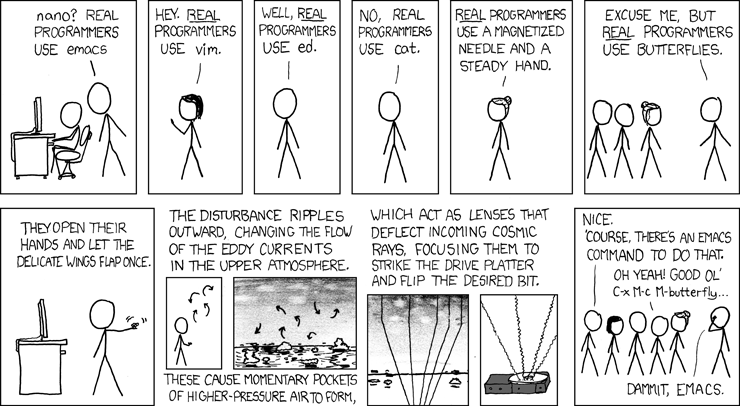
Fun fact, in emacs they added
M-x butterflyas a reference to this xkcd.i’ve been using emacs for a while and i cannot believe i’ve never thought to check for that. sure enough, there it is. amazing.
(for people missing the reference: https://www.gnu.org/fun/jokes/ed-msg.html )
I’ve used Vim, NeoVim, Micro,
mg(1), JOE, and even MS Edit (both the original DOS version and the recent Rust clone). No matter how complex and tailored I wrote my config, though, the features I actually used were included in GNU nano and/or my command shell without any of the bugs, bloat, learning curve, or slop.Using it as my default just makes sense.
Nano is great for editing files. It is absolutely terrible for any amount of text processing or anything other than raw code copied from a tutorial
You guys do text processing on terminal editors?
was gonna say, I have IDEs and other dedicated programs for that
Of course. What do you think vim users do?
Fuck all? ;-)
Alternative joke: try to figure out how to exit
What sort of text processing? I rarely do this, so I usually just rely on things like
sed,ed,sort,uniq, and other shell commands to handle this.
DOS edit was just an alias to qbasic /edit packaged in a .com
oh no, not again.
I’ve wanted to move elsewhere for a long time, thing is I don’t use nano for programming, I use it for config files. For programming I use an IDE, and every time I’ve tried leaving my IDE for emacs with a language server I find I just can’t be bothered to set it up and learn it and make the move. Maybe because while I have some gripes with my current setup…they’re very minor
People program in things like nano? Wow. I want to learn that. I also have only really used them for configs, terminal profiles, …
Can they offer autocomplete and syntax highlighting like vscode can, extendable for different languages and whatnot?
Nano has syntax highlighting out of the box IIRC. I’ve used it for programming in a pinch but no, it’s nowhere near as extensible as VSCode or Vim. It’s a text editor, not an IDE
nano has supported syntax highlighting for a good long while, and for the Debian package at least, comes with a bunch of predefined languages in
/usr/share/nano/*.nanorc.I wouldn’t recommend it for large projects, but I’ve created and edited shell and Perl scripts with it plenty of times.
I’ve programmed in notepad. Not often or very much, because even though I operated in a Windows environment, I didn’t hate myself, but simple edits or creating small files was possible if you knew what you were doing. More could be done too, if you wanted to pretend you were a caveman programmer.
deleted by creator
Emacs: “Sure, fuck it, why not.”
We shouldn’t ask ourselfs why we should do something, but if we could do something.
I’m in the “been working with Linux since the 90s” gang so I call vim vi and nano pico and when I started there was a coolness factor to be considered. I was incredibly uncool so I used whatever I wanted, including pico - I mean you used pine for email back in the day and the interface was nearly identical, so whatever.
But I did want to be at least a tiny bit cooler, so I learned vi in a fairly rudimentary fashion. I can edit, jump, delete, search, replace, copy and paste - oh, and I can exit. I’ve spent so much time using vi, that my brain doesn’t even have to think about exiting, not even whether I want to write or not. It just happens like second nature. It’s actually gotten to where nano seems unduly burdensome to me.
But really, I prefer an IDE for programming. CLI editors will always be for configuration files and shell scripts to me.
Same reason people use notepad on windows. It’s already installed on almost every distro