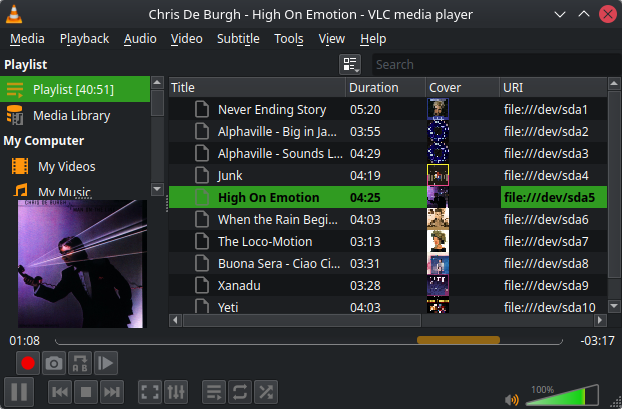
I feel like an idiot realizing block devices are just… block devices.
They just hold data.
Shocker, I know.
But it just hit me when playing around with LVM. I can create a PV directly on a disk. I can even directly format a disk with FS. Floppies don’t tend to have a partition table either. On the other hand, I can partition a partition. I can also just write a Tar directly to disk, like with tape. Or any file.
But with multiple files it starts to become a problem. A-ha! I can just write files to partitions just the same to make reading them simpler.
In this case:
Device      Start    End  Size Name
/dev/sda1    2048  70704 33.5M Limahl - Never Ending Story
/dev/sda2   71680 127492 27.3M Alphaville - Big in Japan
/dev/sda3  129024 201967 35.6M Alphaville - Sounds Like a Melody
/dev/sda4  202752 259447 27.7M Bronski Beat - Junk
/dev/sda5  260096 324229 31.3M Chris De Burgh - High On Emotion
/dev/sda6  325632 386300 29.6M Jermaine Jackson - When the Rain Beg
/dev/sda7  387072 437492 24.6M Kylie Minogue - The Loco-Motion
/dev/sda8  438272 493179 26.8M Mauro - Buona Sera Ciao Ciao
/dev/sda9  493568 545532 25.4M Olivia Newton-John - Xanadu
/dev/sda10 546816 613761 32.7M Radiorama - Yeti
I don’t know if it’s the limitation of GPT, but fdisk let’s me theoretically get up to 232 partitions (default is 27). In practice, this will be lower.
For example:
Expert command (m for help): l
New maximum entries (1-4294967295, default 134217728): 268435456
Not enough space for new partition table!

Expert command (m for help): p

Disk /dev/sda: 57.3 GiB, 61524148224 bytes, 120164352 sectors
Right now I just did it manually. Check file size, divide by sector size, add one if remainder, make partition of that number of sectors, name partition, write partition table, copy file with dd and repeat.
But I should try to automate this. It could be a bash script, but I want to learn C beyond basics, so I guess I should try writing it in that.
Take destination drive and files as arguments, then do what I wrote above. And try not to nuke the wrong disk in the process.
On the other hand, I am so lazy I can’t typically even start with my hobbies. Which sucks because I want to, I just can’t… start.
Anyway, hundreds of files and partitions can’t be processed by hand any easier.
Before gpt partitioning we were limited to 8 partitions total. It was hell. Kids these days…
You get closer to true nirvana when you realize that “everything is a file on Linux” is a lie for children.
When plan 1-8 are over, you have Plan 9 in the file cabinet
IMO it’s one of those bell curve meme things, with ‘everything is a file’ on both ends. I’ve come back around to it.
Oh is that why all my folders are 14kb?
Yes, actually! Your folder is a text file attached to an inode.
Only now you discovered that? Amazing for you, actually.
Wait until you see Plan9. No, I have not (majorly) used it, but imagine it’s stuff being files and filesystem drivers everywhere. The internet is a couple of filesystems. To download stuff from a website, you use the TCP filesystem to mount an HTTP filesystem.
I don’t know if the GUID Partition Table fuckery is better or worse than what I was originally expecting when I thought your title meant you’d replaced your filesystem with ChatGPT and just let it hallucinate files in and out of existence for you. 🫠️
Realized that years ago. Only problem is with dual boot to windows, so be careful if you run that eternal sin of a system.
Usually run luks directly on disk. Sadly windows asked to initialize an unformatted disk when I added a new ssd and I clicked yes. Fortunately it just formatted the backup drive, but that could have been worse.
Linux isn’t about why! It’s about “Why not?”!
Just implement a proper partfs driver then. Metadata might be a challenge.
Also I believe dd is overused. cat with redirection or just cp (I guess) can do the same.
Metadata might be a challenge
I am more worried about dealing with files increasing in size, file deletions, and dealing with fragmentation.
Really, this is closer to a Tar archive. You can append just fine, but other than that, it starts to become a problem.
Sooooo… File systems are really just a large file, huh? I could just put a JSON with byte arrays there instead and no one would know…
It is kinda obvious, but I never thought about generalizing it this way either
Ooh, JSON! The Electron crowd can now extend to the FS!
A drive is just an addressed linear memory space, like RAM, though with physical characteristics that you need to be aware of if you’re designing a useful file system.
The real difficulty is that the address space is huge, and you can’t trust that data that you write it won’t get cut off in mid write or get some bits flipped while it’s just sitting there. That makes designing the data structures that make up a “file” difficult.
All the way down, it is just a giant array
Hmm very interesting. That makes sense, but now I have more questions. Like what the fuck is file a system actually? Like I know what it is, and I know the features of a lot of the popular ones, but like what is it ACTUALLY?
If you really want to know, I highly recommend reading Piratical File System Design with the Be FS - Dominic Giampalo as a free PDF. It goes into enough detail that you absolutely can write a modern filesystem based on just what is in it, including good diagrams and code snippets, but it doesn’t just have page after page of code to wade through. It’s a surprisingly enjoyable read.
If you don’t know, Dominic is the author of the Be FS (obviously) but ended up at Apple and was a lead in their filesystem team for two decades. He also has the most perfect minimal personal webpage I’ve seen in a long time.
I’ve developed two filesystems, and am working on a third. I wish I had read that book before I started on my first one.
My ISP classified this site as bad.

Edit: and the pdf link shows the “disconnected :o” page. Maybe for the same reason.
Piratical File System
I’m rather disappointed that there wasn’t any pirates involved.
Awesome! I will certainly give that a read. I’ve always wanted to make a file system.
Go for it! If you like designing low level data structures it’s a lot of fun, and a userspace RAM or file backed filesystem via FUSE is surprisingly approachable.
Wow, that textbook looks great. Thanks for dropping some knowledge! ❤️
Well it’s a program that turns a huge array of bytes into a directory tree by allocating some of these bytes for data structures holding directory structure, metadata etc. The simplest to understand example would be FAT16 or floppy formats from 80s home computers. These had a lot of shortcomings, which were solved by more and more complex data structures.
You can write a Python script that reads /dev/sda byte by byte and displays the directory tree. That would be a simple file system driver.
But what if we left the tree building away and add tags and groups and metadata instead?
The closest production system to that I’ve seen is IBM i libraries, or maybe the failed WinFS.
The problem is that without namespacing, how do you tell one
READMEfrom another? And once you have a unique namespacing system, you’re basically back to a tree with extra steps. Sure, from the FS POV, you could keep everything in a flat space with uniqueness determined by inode or a UUID but those aren’t very human friendly.Grouping? Which is directories, except not in a fixed place.
Ok, maybe then we’ll get sub-groups or nested groups and then we’re back to fixed paths again.
I just thought of grouped tags as a nice (partial) way around link rot in servers. A tree breaks a lot with a changed name inbetween, while file-bound attributes are more robust.
Also, the Unix tooling still crawling trees just doesn’t align well with modern computer/phone use and disk sizes. And makes features like hardlinks and xattributes mostly useless. Doesn’t help that you can’t just parse the tree yourself either. Honestly, it’s all just glued together clusterfuck.
I think this all has been tried and didn’t get traction. Although it has been before everyone had devices that hide the filesystem from you.
Haiku does. Partly.
And yeah, our (desktop) software ecosystrms are actually still in the client-server mode, with a set of patches and workarounds. Not purpose-built for desktop or mobile.
https://stackoverflow.com/questions/3263036/file-system-that-uses-tags-rather-than-folders#3263550 but I remember reading elsewhere about actual file systems done this way, not overlays above hierarchical ones