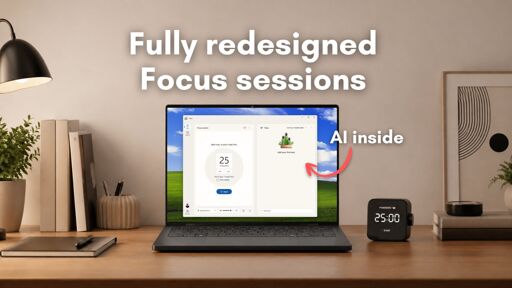
In the future, when Windows users say “advanced users can turn that crap off” they’ll mean the power button, not the group policy editor.
The clock should be used for entertainment purposes only
AI hallucination with time, and randomly hallucinated alarms should be fun.
GPOs already suck and MS is forcing admins to adopt program rules out of Intune to get the same effect. See CoPilot GPO failures for further depth.
Our test version of the Clock app is missing the actual clock and everything else, like the Timer, Alarm, Stopwatch, and World clock
Author then goes on to praise the rounded edges omg can you believe it rounded edges on a clock!!!
“Lovely plumage”
A clock that doesn’t tell time, and they follow that quote up with
which is understandable.
No it’s not.
I know a lot of people don’t like or use Windows, but the multiple timers and stopwatch functionality are genuinely useful and pleasant to look at. And “focus session” already exists in it.
A “clock” that doesn’t do anything that a clock does, but it can write you a plausible-sounding essay on what a clock should do!
Hello, this is the Linux comment
I’d switch if every discussion about Linux didn’t devolve into lengthy discussions about the complicated ways you need get anything working on it.
Like… what exactly lol?
Most discussions about Linux here devolve into distro sledging lol.
Even the joke stuff like Nvidia is from a bygone era.
My personal recommendation is Fedora, but any competent distro is miles more user friendly than current windows 11.
Distros from that joke stuff era are more user friendly than Windows 11.
I’m still plugging along with Windows 10. :) It’s mostly just laziness about having to go through and reinstall everything on a clean install that’s causing the most resistance to change, and the thought of learning an operating system I’m not familiar with just adds to the inertia.
What even are the significant differences with different distros? I’ve seen Bazzite recommended as the best one for gaming. Mint comes pretty strongly recommended as well.
laziness about having to go through and reinstall everything on a clean install
Package managers make this a breeze to the point that people upload their personal script to github so they can run one command to get all of their software and theming on a new PC lol.
No need to even go that far, just pop open the app “store” (everything is free lol) and just click away at everything you want. Can probably get most of your stuff in 10 minutes tops.
What even are the significant differences with different distros?
It boils down to how effective the user experience & preference is and what the backend is built on (which usually affects user experience & preference lol).
Mint is highly recommended because it cleans up a ton of the random stuff from Ubuntu upstream and maintains a clean and low cost (cpu/ram usage) desktop environment that’s very easy to use. It’s highly recommended for anyone who is new or inexperienced with linux or OSs in general and just wants to get on with life. The single downside is that its packages are not the latest and greatest, so its great for everything except gaming where you want the new stuff like drivers, proton upgrades, new features, etc.
Fedora is what Ubuntu was 15 years ago, which is best all around user experience. It chooses very sensible but cutting edge packages which gives you excellent performance benefits of new tech like BTRFS/XFS without losing out on stability. It’s also the distro Linus himself uses because he finds it easy to just install and again, get on with life lol. Fedora also has excellent user docs and forums which is great if you need help with something. Only downside is I think you have to flick a switch (or run a command) to enable all video codecs because they don’t ship it on their main package repository since H264 & HEVC have weird licensing issues.
Bazzite is a downstream of Fedora Silverblue, which is an atomic distro that makes it really hard to screw something up by using a read only root and rollback-able updates, similar to Android and SteamOS. It was specifically designed to make gaming on handhelds an easy out of box experience so you don’t have to manually set up stuff like touchscreen keyboards or power settings on non PC hardware. You can run it on PC if you’d like the benefit of the rollback image system which can unbork your machine super easy, though it already is quite hard to bork because the root filesystem is read only, so apps are installed in a similar way as Android apps (Flatpak).
Learning Linux is actually quite intuitive (thankfully), and everything from the GUI perspective is mostly the same, if not an outright improvement in several areas. I would highly recommend playing with the live install of whichever distro you pick along with the desktop environment to get a feel for how it looks before you commit to an install.
Desktop Environments are also not tied to distros. You can basically choose any DE on any distro (like Mint’s Cinnamon on Fedora), but the two biggest ones are GNOME (Mac like) and KDE (Windows like). I think KDE is way better than GNOME, but you can play with both & more to see which one you prefer.
Your main issue to figure out when permanently switching is if there is any software or process that you rely on in Windows that would be different in Linux. For me it was switching from Microsoft Office to LibreOffice (there are also more, like OnlyOffice), which was completely painless since it was like 95% the same and could open up docx just fine.
The other possible ones could be:
- Adobe stuff (some stuff like PS works, but it’s a bit involved to setup the first time)
- Games that use kernel level anticheat (big nono in linux because it breaks security)
The second one is really what’s keeping a lot of people from making a permanent change which I’m hoping Valve can change with the upcoming Steam Machine because even for Windows, its like running a rootkit that really should not have that level of access to your PC.
I don’t play any games that utilize it, but you might and it won’t work on linux until the publisher decides to let it: https://areweanticheatyet.com/. The comments are usually outdated back from when the game first released, so as long is it’s green or blue, it should run out of box.
Some publishers (Epic Games mostly) are also just dicks that don’t use kernel level in some games but still choose not to enable linux support when compiling their game, despite all the major anitcheat vendors supporting linux and even mac.
The good news is that for everything else, there’s a pretty good chance you’ll actually see an increase in performance from Windows. The biggest one for me was World of Warships which went from 2 minutes load times down to just 30 seconds on a hard drive, and about 15-20%+ FPS even when on an SSD.
Yeah, I get that. But you’ll have to do that anyway and when the time comes, getting Linux will be there for you.
Regarding distros, it really doesn’t matter at the beginning, hoping from distro to distro if you need it later is dead easy, most of the time it’s as easy as running one command to install all the apps, and copying your /home/ dir, it will transfer wast majority of all your settings, if not all. Some apps are stubborn but those are outliers.
So the choice of a distro basically comes to a single thing you care about. Like, for example, some are “rolling release”, which means they try to have all the libs and apps and other shit up to date, some are “stable”, which means they don’t update that often. Both have their ups and downs, personally I find rolling releases easier to deal with.
The biggest difference for a novice is what desktop environment is the default one, and that’s basically a matter of preference (but actually KDE is the best of them, and that’s my objective opinion).
e: ^^^ don’t downvote them -_-;;
Fair.
There are about 30 different ways to do any single thing and whatever way you choose is guaranteed to provoke 17 neckbeards into writing essays on why you’re wrong and, while they’re at it, you also picked the wrong distro.
On the other hand:
- the clocks just tell time
- your user directory isn’t stored in a data center 1500 miles away
- the update process understands the concept of consent, and;
- you can create a local user account during install without … whatever this is.
There are about 30 different ways to do any single thing and whatever way you choose is guaranteed to provoke 17 neckbeards into writing essays on why you’re wrong and, while they’re at it, you also picked the wrong distro.
My favorite one is
“Oh linux is easy these days, you don’t have to even open the terminal”
“Haha noob why did you install the flatpak version, never do that, always install everything as .debs through terminal”You can just click on debs in your file manager, no different from an exe in that aspect… but sure, i guess you could run an exe via cmd if you really wanted to
Haha oh yes, it’s just whenever I search for some solutions it feels like I end up finding at least one reply with the instructions to use terminal only for installing
As someone who isn’t scared of the terminal, I don’t get the fear really. What’s the difference from opening a store app or web browser and searching for an application and asking your package manager to search for an application? Either way, you just type the name and it gives you results. I guess the package manager you at least know it’s from a mostly trusted source (usually, unless you do something to allow exceptions), while a web search isn’t always.
Why you find terminal instructions online is because it works for every system though. It doesn’t matter what distro you have, or what packages; they all have a terminal and the same base. This isn’t true for package manager instructions though, because there are several, and different distros provide different ones.
I’d imagine the fear is just because a lot of people are not tech savvy at all and tend to be scared of new things, “googling” and pushing colorful buttons is something most people are used to, but writing phrases you don’t fully understand into a mysterious text box is not. Though personally I have no fear towards terminal either, so maybe I’m wrong with that analysis
I’m old, and can’t be fucked learning a whole new system. I just want to browse the internet and play my games. The biggest barrier is getting my simracing gear and modded Assetto Corsa working on it.
Yeah, I completely understand. I bounced off Linux desktop several times and I’m a sysadmin.
It’s only the last few years where there have been rapid and significant improvements to get gaming so it “just works*” and both of the popular desktop environments, KDE (Windows-like) and gnome (Mac-like) have had a heavy focus on fixing all of the little fiddly annoyances that turned people off.
It’s not perfect and it can be annoying, but its dramatically better than it was 5 years ago while Windows keeps moving in the opposite direction.
I’m not trying to sell you on it really, Linus doesn’t pay me commissions. Windows isn’t THAT bad and learning a new OS is a big ask.
I’ve just been impressed by the state of things and enjoy yapping about it.
Obligatory “Gnome is NOT Mac-like” comment.
The Windows people think Gnome is Mac-like. Hah, no it’s not! Gnome is its own weird thing.
KDE can actually get a lot closer to Mac than Gnome can, if you add a top menu bar, rearrange some stuff, and move the titlebar buttons around.
(We came from Mac land originally, and that’s how we have our KDE set up. Mostly.)
– Frost
This was somewhat true 15 to 10 years ago. It wasn’t true for a while. There is however endless amount of discussions about the way to make it just the way you like it and because a lot of that is subjective, those will get heated. However if you want it to just work, that is pretty easy to arrange.
My wife is a linguist and an English teacher, about as far from being a tech person as you can get. She’s running Arch daily since 2020, and the only help she needed from me was to set it up and to teach how to install and update apps. The amount of tech support that was required of me almost daily when she was running Windows can’t even be compared.That depends on the distro, just choose one that’s beginner-friendly or “works out of the box”
LMDE, Zorin, etc.
OK, so tell me how to get Assetto Corsa Content Manager, Custom Shaders Patch and all the other mods I have installed, Quest 2 VR and Moza Pit House working in Linux, because that’s the thing keeping me from switching. Would WINE work well enough for that?
Ok, my coffee fueled morning research:
Essentially, if you can install the game with Steam it works out of the box. According to Protondb (https://www.protondb.com/app/244210) the game has a Gold rating which means it works without any major flaws.
-
There’s a guide to get Assetto Corsa setup: https://steamcommunity.com/sharedfiles/filedetails/?id=2828364666
-
If you don’t want to fuss with all of this manually, someone has created a script to do most of the work here: https://github.com/sihawido/assettocorsa-linux-setup
-
As far as mods, I’d need to know which other mods you use to see if there are any specific instructions/issues.
-
List of force feedback steering wheels, the driver needed to use them and a rating of how well they work with Linux. It looks like all Moza products have a Platinum rating so they work flawlessly. https://github.com/JacKeTUs/linux-steering-wheels
-
Moza Pit House doesn’t work, but someone has created a flatpak native Linux version: https://flathub.org/en/apps/io.github.lawstorant.boxflat
-
Here’s a compilation of links for software to get various pieces of simracing gear working: https://github.com/LukasLichten/awesome-linux-simracing
-
Steam VR via Quest 2 using ALVR: https://pawamoy.github.io/posts/steam-linux-alvr-quest2/
Legend! I’m saving this post for when I do finally get the motivation to switch.
The main mods I’m concerned about are Custom Shaders Patch and Pure, but I believe the devs are working on Linux versions of those as well.
If you do and run into any trouble, feel free to DM me. :)
Thanks. I will say, though, that still seems pretty lengthy and complicated to get working. ;) But I guess I only have to do it once.
Most of the other mods are simply cars and tracks, which I guess are just drag and drop like in Windows. The only other one that might be an issue is the 2Real traffic/pedestrian mods.
-
Linux Mint is also great for new users.
LMDE = Linux Mint Debian Edition.
How long can a discussion be about pressing a button to install a thing from the package manager, then launch said thing?
For most popular distros most stuff works out of the gate. It’s been a long time since I’ve had to wrestle with anything vexing.
The big one I see across most distros is: Pipewire needs better default minimum quants.
I see so many complaints about crackling audio and it’s almost always that pipewire defaults to using a tiny buffer for lower latency and system load (like gaming) can cause the buffers to empty resulting in crackling.
If this happens, you can fix it temporarily (it’ll last until you reboot):
pw-metadata -n settings 0 clock force-quantum 256Increase the 256 to 512 or higher until the crackling goes away (it doesn’t need to be a power of two, any integer will work). It’ll take effect immediately you don’t need to restart pipewire.
Set alarm for 10am
OK setting alarm for 20am
Microsoft: “We want to fix Windows and make it great again!”
The fix:
Slopodoro? Pomoslop?
sry
I’m still mad Microsoft hasn’t integrated Copilot into the calculator app yet. How can you possibly do calculations without AI confidently telling you wrong results?? /s
Don’t give them more ideas!
Everyone keep helping more people switch to Linux and help them be part of in-person/online groups. To discuss Linux, and get help where needed.
This is a fcking joke! I’m so sick of Microslop integrating AI into fcking everything. I just want to use my PC without any of this bloat. It just gets worse and worse. I can’t believe they would do somethi… wait a minute… I’m using linux. Nevermind then.
I think there’s something wrong with your u key. It doesn’t seem to work when preceded by an f.
How fnny. My keyboard has been acting a bit fnky lately.
What was that about Windows K2 again? Ah, who cares
They gave up, K2 is a tougher climb than Everest.
much more dangerous too,
If they had tried at least we’d get a 1/5 chance that the windows market stranglehold dies lol.
I thought microsoft wanted to put less ai in their shit? Who would have thaught.
What follows is our plan to raise the bar on Windows 11 quality this year, with a focus on performance, reliability and well-crafted experiences.
Pavan Davuluri
Executive Vice President, Windows + DevicesOnly thing that could possibly help would be him falling out a window on-top of the guy that would replace him. Maybe third in line isn’t a chud
Sorry, it’s chuds all the way down
Shit were fucked then 🤣
I think instead of the computer showing you the time, they should replace the clock program with a chat prompt so you can ask the computer to guess what the time is
Yeah, good luck. I’m fuddling about with a local AI setup, with RAG and web access, and it usually accesses like 2-3 websites and takes a bit to figure out time and date.
this is a joke… right?
It takes Windows 11 a minute to load the “control panel” window… just hangs.
Re-release XP and be done with it, you’re bad and you should feel bad.
Early W10 was actually pretty decent. I have it running on a windows tablet, and a stick pc, both 2gb RAM.
One is getting Linux, but I have to do a bit of digging to decide on the distro, as many are becoming kind of bloated too.
I use CP/M, BTW.